Silos
Menu

Product

Product overviewThe panelNeeds youAgentsTasksAutomationsSilosEnginesOpen source

Solutions

Solutions overviewCoding agentsA small businessSupportFinance

Resources

Compared with terminal tabs

Company

About

Docs

All the docsInstall

Product

Your agents work. You decide what is yours.

Silos is an open-source app that runs on your own machine over the coding agents you already use: Claude Code by default, OpenCode as the second engine. Use it beside you while you develop, or let agents hold a job and keep working when you step away.

With you: every conversation, account and skill in one place

Every conversation of every project sits in one sidebar, including the ones you started by hand in a terminal. Open one as the real console, the unmodified CLI in your browser, or as a chat.

Beside it, the context column says which account and model it runs on, how much of each usage window is spent, and what the session loaded at start, split by whose each part is.

acme-shop

  • Builder · Invoice exportjust now
  • Builder · Fix the flaky checkout test13m ago
  • Support · Northwind wholesale inquiry1m ago

acme-books

  • Finance · Close Augustwaiting on you
  • Finance · Overdue invoices2m ago
  • Started in a terminal · Speed up the buildread only
Conversations of several projects in one list.

On its own: agents hold a job and keep working while you are away

An agent has a name, a mission, a territory and its own secrets. You hand it work in a sentence with Give, and if it is On its own it starts without you, wakes on its heartbeat and stops at its daily limits.

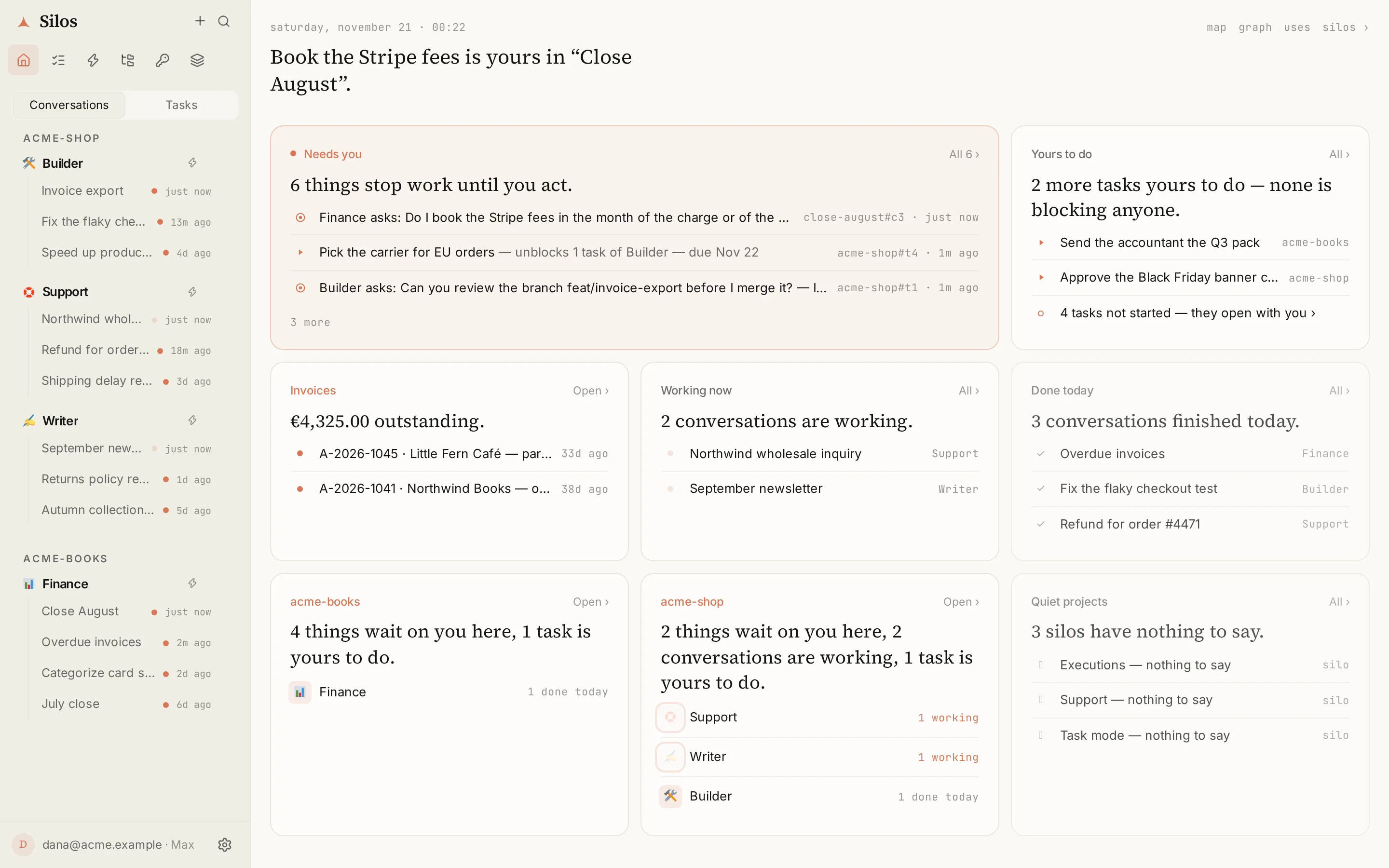
Needs you, the one inbox on Home, brings you only what blocks on you, with the answer one tap away. When nothing does, the pulse says "All quiet."

Silos' home screen: agents and conversations on the left, a sentence on top, then Needs you, Yours to do, Working now, Done today and a tile per project.
Home: the pulse, Needs you, Yours to do and what is working now. Demo data.

Silos: the records of your work on the same screen

A silo is a kind of record your agents keep, such as invoices, support cases or contracts, plus a short file that tells Silos how to show it: what it says on Home, what reaches Needs you and which buttons it has.

The file carries no code. You approve what it will read before it shows anything.

Records an agent keeps

invoices/A-2026-1041.json
invoices/A-2026-1044.json
invoices/A-2026-1045.json

A short file

silo.json
  what a record is called
  what reaches your inbox
  which buttons it has

On your screen

  • Home€4,325.00 outstanding
  • Needs youNorthwind Books — overdue
  • Its page9 invoices
Records, a short file, and where they appear.

Yours: your machine, your engine, your files

Silos is MIT and listens only on 127.0.0.1 by default. Tasks are JSON in the project folder, conversations are the engine's own transcripts, and Silos' state lives under ~/.silos. There is no database.

Your agents run on the Claude subscription you already have, or on a provider you choose through OpenCode. Silos never modifies the engine.

Builder

the same agent, the engine you choose

Claude Codeyour subscription
OpenCodeany provider, your key
One agent, over Claude Code or OpenCode.

Questions

Is it free?

Silos is open source under the MIT license, and you run it on your own machine. Your agents' turns run on your own Claude subscription, key or provider, so that is what they spend.

Do I have to change how I work to try it?

No. Conversations you start by hand in a terminal show up in Silos too, and Silos only reads sessions it did not create. Agents, tasks and automations come when you want them.

Does it change how Claude Code works?

No. Silos runs the unmodified claude command and reaches it only through what Claude Code documents: flags, settings files, hooks, CLAUDE.md, skills and its native memory.

What do I need to install it?

Node.js 22.13 or newer, Claude Code and a Claude subscription to sign in with. tmux is recommended for the real console, and on Linux a C/C++ toolchain is needed for the in-browser terminal. It installs with one command in a terminal.

Does anything leave my machine?

Your agents' turns go to the model provider you chose, as they would without Silos. Google sign-in and push notifications are optional and off until you set them up. The Open source page lists the rest.

Install it and look

One command starts Silos on your machine, and the first screen asks who you want working for you.