Silos
Menu

Product

Product overviewThe panelNeeds youAgentsTasksAutomationsSilosEnginesOpen source

Solutions

Solutions overviewCoding agentsA small businessSupportFinance

Resources

Compared with terminal tabs

Company

About

Docs

All the docsInstall

Product › Silos

Install a way of working.

A silo is a package you install and assign to agents: instructions for them, the records they keep and the views it adds to the panel. Any mix of the three: Task mode is only instructions, System only a page, Support all three.

Records in your folders, shown where you already look

The records are ordinary files in your folders. The manifest, silo.json, declares where they live, how each one reads as a sentence, what Home's pulse counts and what reaches Needs you.

It carries no code and no UI. Every button a silo offers is something Silos already does, such as setting a field, opening a record or messaging the agent that keeps it. Something else writes the records: an agent following the silo's brief, a skill, or a sync on a schedule.

Home with an installed silo: a tile says how much is outstanding and lists two overdue invoices.
Home with an invoices silo: what is outstanding, and two overdue invoices. Demo data.

Three real ones

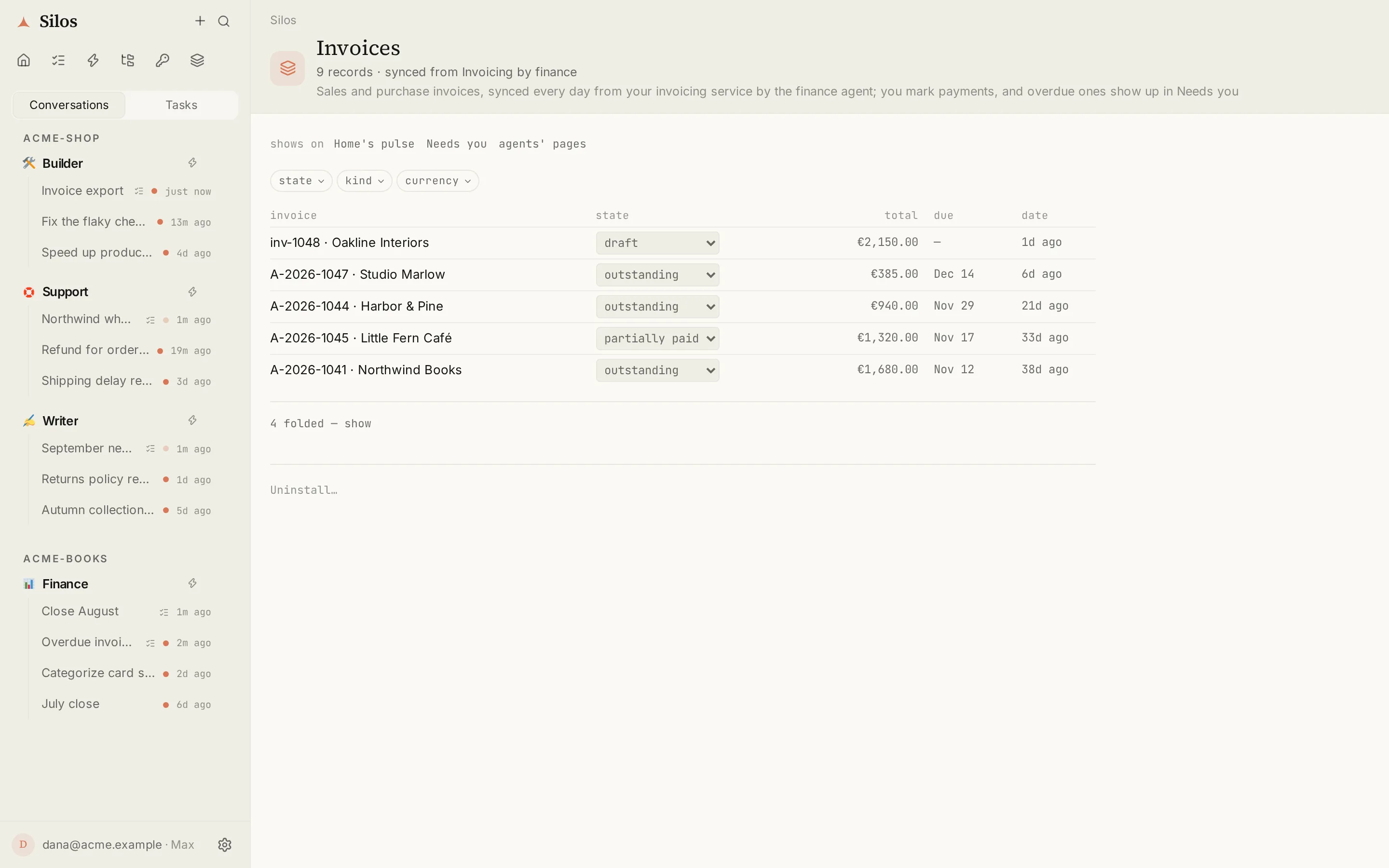
Support comes with Silos: an agent with a mailbox opens a case per customer and keeps its state and notes; a case that needs your decision, or a reply draft that is ready, reaches Needs you. An invoices silo syncs sale and purchase invoices every day, and an overdue one reaches Needs you.

Hierarchy holds no records: it keeps who reports to whom, so a stuck task goes up the chain one agent at a time before it reaches you. A reporting line grants no access and no authority.

An invoices silo's page: five invoices with their state, amount and due date.
An invoices silo's page: five invoices with state, amount and due date. Demo data.

You approve what it will read, and an agent can write one

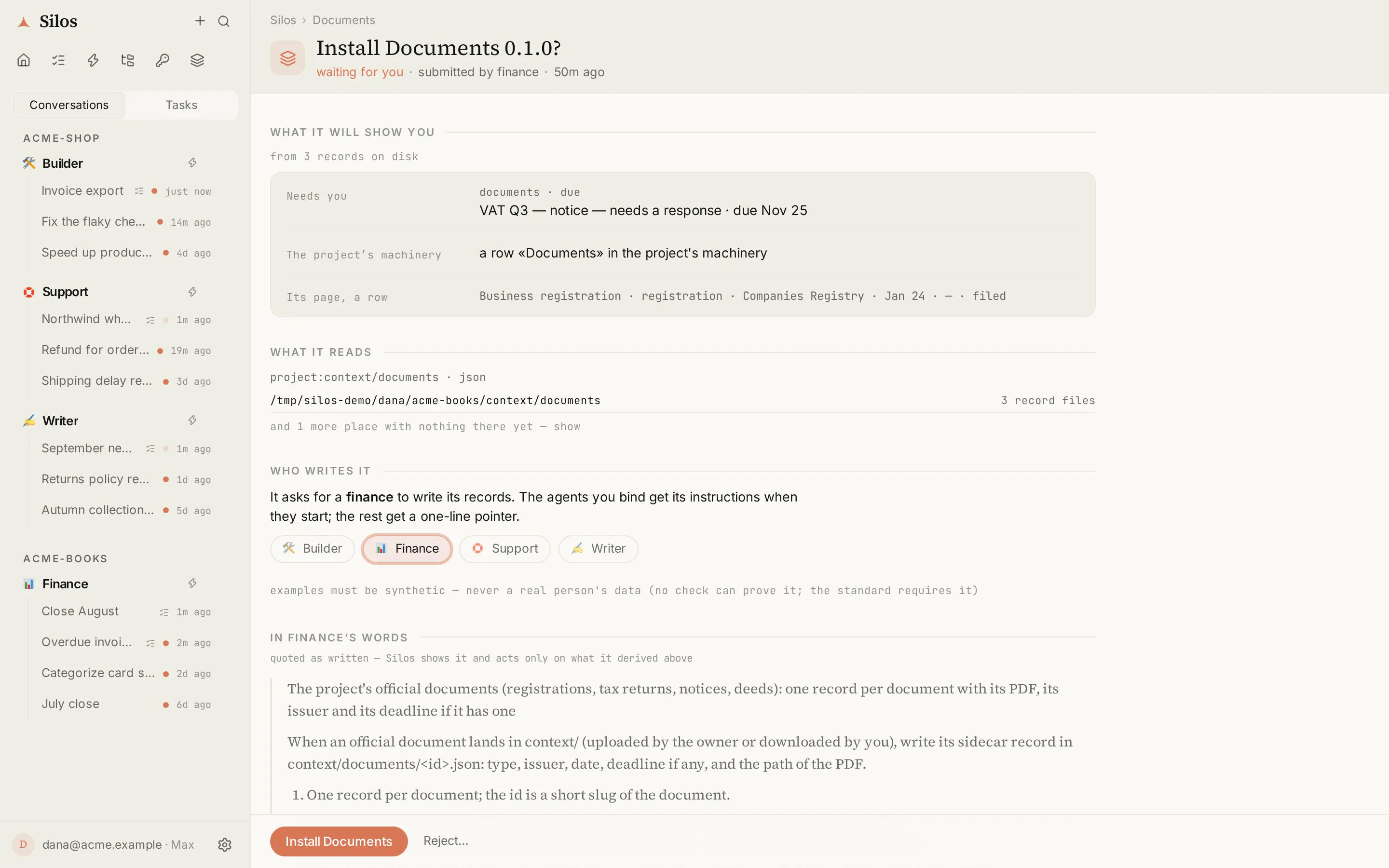
Nothing activates on paste. The review is worked out by Silos from the manifest, never from the author's words: what it will show you, the exact paths it reads, who writes it and, for an update, every widening of what it may do.

Ask an agent for one in a sentence, such as "keep track of our supplier contracts and tell me a month before one renews". The silo-author skill settles the record with you, writes the manifest, checks it and submits it, and it waits in Needs you with Review.

The approval page of a silo: what it will show, the folder it reads, and who writes its records.
A silo's approval: what it will show, the folder it reads, who writes it. Demo data.

A silo compared with a shared spreadsheet

A shared spreadsheetSilos
Where records liveIn the sheetFiles in your folders
Who keeps them currentWhoever remembersThe agent bound to it
Something overdueA filter you checkA row in Needs you
Ad hoc analysisFine as it isNot what a silo is for

Questions

Do I have to write JSON?

No, if an agent writes it: the silo-author skill does that from your sentence. To write one yourself, the Writing a silo page has a minimal manifest that validates, and npm run silo-check tests it before you hand it over.

Can a silo run code on my machine?

The manifest cannot: it only declares. Whatever writes the records, an agent, its skill or a scheduled sync, runs the way any agent or automation does, and you choose whether to create a proposed sync when you approve.

Which silos come with Silos?

Support, Task mode and Silos' own task lists are installed at start and marked "Comes with Silos". Reference silos such as an invoices silo are listed under Available in Settings › Silos.

What happens when I uninstall one?

It leaves every surface and its producer brief stops. Its records, files and conventions stay on disk, and Settings › Silos keeps a Reinstall door.

Where are the full rules?

In the Silo Standard v0, in the Silos repository under docs/standard/: the schema, the expression language for conditions and every check a manifest must pass.

Ask an agent for your first silo

Say what you want kept and shown in one sentence, then approve what it will read.